Help
Controls
Every key and touch control, from the game's input code.
#Desktop (keyboard and mouse)
| Input | Action |
|---|---|
| W A S D | Move |
| Shift (hold) | Creep: quieter, slower |
| Mouse | Aim |
| Left click (hold) | Fire |
| R | Reload |
| Space or Q | Ability |
| G (hold, release) or right click | Throw a grenade at the cursor |
| M | Tactical map (M or Esc closes it) |
| Esc or P | Pause |
| Enter or Space | Confirm on menus |
Grenades on PC land where the cursor is (2 to 9 m); holding G shows where it will land.
#Phone (touch)
- Left thumb: the move stick follows your thumb if it drifts past the rim. Push less than 60% of the way to creep.
- Right thumb: aim. It fires once you push past 35% of the stick; inside that it only turns you. There is no auto-fire.
- With the aim thumb lifted you face where you walk.
- Ability button: tap. Grenade button: tap to throw 6.5 m along your aim, or drag from it to aim the throw. Reload button: R.
- MAP opens the tactical map; the pause button is top right.
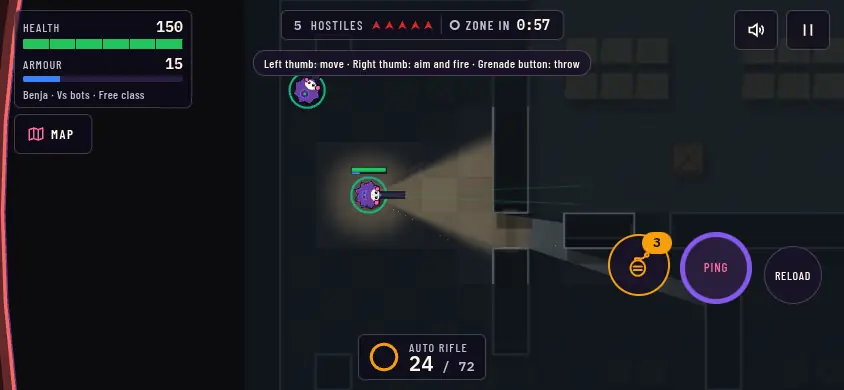
- Health and armour
- Map
- Pause
- Grenade
- Ability
- Reload
- Weapon and ammo
#Tablet
Tablets use the touch controls above. With a keyboard and mouse attached, the desktop controls work too.
#Settings that change controls
- PC keys: Settings, Change keys lets you rebind each action; the keys above are the defaults, and Reset to defaults restores them.
- Stick size for touch.
- HUD size (85% to 130%) and Motion (System, Reduced or Full: Reduced removes screen shake, pulses and entrances).